Record payments, import your bank statement, match every line.
Upload a CSV from FNB, Standard Bank, Nedbank, ABSA, Capitec, or Investec. Rebill matches credits to invoices and turns debits into categorised expenses. No manual reconciliation.
Bank import is free on all plans. No transaction limits.
Three steps to reconciled books
Import, match, done. No bank feeds to configure, no monthly fees, no API keys.
Upload your CSV
Export a CSV from your bank's online portal and upload it to Rebill. The header row is detected automatically and you map the columns once.
Match payments
Rebill suggests which invoice each credit belongs to based on amount, reference, and client name. Click to confirm and the payment is recorded.
Categorise expenses
Debits become expenses with a single click. Pick a category and Rebill creates the expense with the date, amount, and supplier from the statement.
Built for South African bank statements
Every SA bank formats CSV files differently. Rebill handles the quirks so you don't have to.
Smart Header Detection
Many SA banks add junk rows at the top of their CSV exports. Rebill detects where the real header starts and skips everything above it automatically.
Saved Column Mappings
Map columns once and save the layout as "FNB Cheque" or "Investec Business". Next import from the same bank, select the mapping and skip straight to review.
Automatic Deduplication
Every transaction gets a unique fingerprint. Import the same file twice or overlapping date ranges and Rebill skips duplicates automatically. No double payments.
Smart Invoice Suggestions
When matching credits, Rebill suggests invoices by comparing the amount, bank reference, and client name. Most matches are one click. Manual search is always available as a fallback.
Bulk Categorise Expenses
Select multiple debits, pick a category, and create expenses in bulk. Perfect for processing a month of transactions quickly without clicking through each one individually.
Free on All Plans
Bank import is available on every Rebill plan, including the free tier. No transaction limits on importing. The only caps that apply are your plan's invoice and expense limits when matching or categorising.
Supported South African banks
Pre-built column mappings for the big six. Any bank with CSV export works too.
Not listed? If your bank exports CSV, it works. Just map the columns manually on first import.
A payment ledger, not a tick box
Payments belong to the client.
Record one EFT and allocate it across several invoices. Overpayments become credit that applies to the next invoice, or on demand.
Import any South African bank's CSV.
Rebill reads the common bank export formats. Each line is matched to an open invoice by amount and reference; you confirm or reassign.
Undo without damage.
Unmatch a line and the invoice goes back to outstanding. Nothing is deleted behind your back.
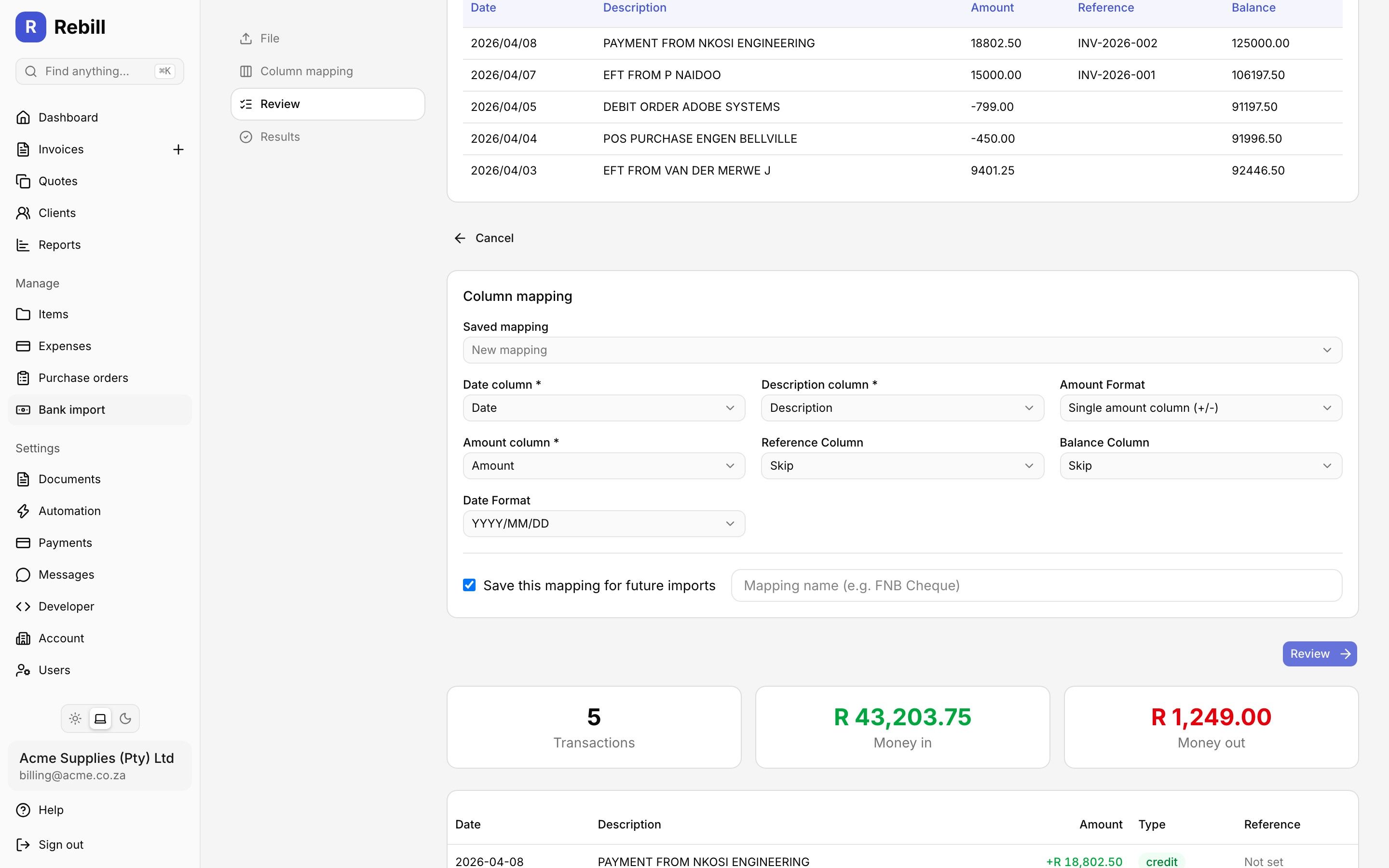
Review imported bank transactions and match payments to invoices.
Quick answer
What is bank statement import for small businesses?
Bank statement import is a feature that lets small business owners upload their bank's CSV transaction export and reconcile it against their invoicing and expense records. In South Africa, automatic bank feeds (like those used by large accounting platforms) are often expensive or unavailable for smaller businesses. CSV import bridges this gap: you export your statement from FNB, Standard Bank, Nedbank, ABSA, Capitec, Investec, or any other bank, upload it, and match each transaction. Credits get matched to outstanding invoices (recording a payment), and debits get categorised as business expenses. Rebill handles the quirks of South African bank CSV formats (different date formats, split debit/credit columns, junk header rows) and fingerprints every transaction to prevent duplicates. Bank import is free on all Rebill plans with no transaction limits. For more on staying organised, read our guide on how to track business expenses in South Africa.
Frequently asked questions
Which South African banks does Rebill support for CSV import?
How does bank statement matching work in Rebill?
What happens if I import the same bank statement twice?
Is bank import free on Rebill?
Can I save column mappings for different bank accounts?
Can one payment cover more than one invoice?
Explore more Rebill features
Stop reconciling by hand
Import your bank statement, match payments to invoices, and categorise expenses in minutes. Free on all plans.